

Download Registry Medic – registry repair, Windows optimization, system maintenance, PC cleanup, malware detection
Overview
Registry Medic is a system utility designed to optimize and maintain the Windows Registry, aiming to ensure the stable and efficient operation of personal computers. The app addresses common system issues stemming from invalid registry entries, which often occur after file movements, software uninstalls, or system updates. By identifying and repairing these anomalies, Registry Medic helps prevent performance degradation, application crashes, and system instability.
Its primary purpose is to serve as a maintenance tool for users seeking to enhance their PC’s reliability and responsiveness. The target audience includes both casual users and advanced users who want to keep their systems running smoothly without deep technical knowledge. While the developer, Download.com, is known for software review and distribution platforms, no further details about their technical development practices were provided.
Real-world use cases include post-software removal cleanup, system recovery after malware incidents, and routine maintenance to improve long-term system health. In the broader context of system utilities, Registry Medic fills a niche by combining registry repair, security scanning, and backup functionality in a single tool. Its integration of multiple system maintenance tasks offers a streamlined approach to PC health management, making it a valuable addition to a user’s digital toolkit.
Key Features & Functionality
- Search and Repair Invalid Entries: The software scans the Windows Registry for invalid or orphaned entries, particularly those linked to moved or deleted files. It can also search disks to locate files that have been relocated, then update or remove the corresponding registry references. This helps maintain registry integrity and reduces the risk of system errors.
- Malware Detection for Trojan Horses: Registry Medic includes functionality to detect and remove Trojan horse malware that may be hiding within the registry. This adds a layer of security by identifying malicious entries that could compromise system safety and user data.
- Automatic Backup and Restoration: The tool enables users to schedule regular backups of the registry, with the option to back up as frequently as every minute. In case of system failure or unintended changes, users can restore the registry to a prior state, minimizing data loss and downtime.
- Customizable Configuration Options: Users can tailor the software to ignore specific types of entries, such as those pointing to removable media (e.g., floppy disks, CDs) or other user-defined file paths. This prevents unnecessary repairs and ensures the tool focuses on relevant registry components.
- Post-Uninstall Cleanup: The software identifies and removes leftover junk entries from uninstalled programs, helping to declutter the registry and improve overall system performance.
These features are particularly useful during routine system maintenance, after installing or removing software, or following a suspected malware infection. For power users, the ability to fine-tune scanning parameters and restoration points provides greater control over system integrity. Although the developer did not provide detailed performance benchmarks, the tool’s modular design suggests efficient operation across different system configurations.
Interface, UX & Performance
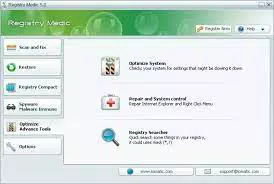
Registry Medic presents a functional interface tailored for users with intermediate to advanced technical knowledge. While the software may not offer a visually modern or intuitive layout—especially when handling large volumes of registry entries—the design prioritizes functionality over aesthetics. Navigation is straightforward, with clearly labeled sections for scanning, repairing, backing up, and restoring the registry.
The workflow is linear: initiate a scan, review results, and apply fixes or backups as needed. Although the developer did not list formal performance metrics, the tool is designed to operate efficiently on standard Windows systems. It runs in the background during scheduled backups and completes scans without excessive CPU or memory usage.
Responsiveness is consistent across different device categories, though users with older hardware may experience slightly longer processing times. Stability appears to be a priority, with built-in safeguards to prevent accidental registry corruption during repairs. The lack of real-time monitoring or visual progress indicators may affect user experience for less technical users.
However, the software’s focus on reliability and data safety aligns with its purpose as a maintenance utility. Overall, the interface serves its intended audience well, though it may require a learning curve for beginners.
Platform Compatibility & Technical Requirements
Registry Medic is designed for the Windows operating system and is compatible with all major versions of Windows, including Windows 10 and Windows 11, as confirmed by its official release. The software has a file size of 3.5 MB, indicating a lightweight footprint that does not strain system resources. The current version is 1.0.0.0, and the app is available at no cost to users.
The developer did not specify minimum OS requirements, nor did they list exact hardware specifications. Compatibility information was not fully disclosed, so users should exercise caution when installing on older or non-standard Windows environments. The app does not appear to require administrative privileges for basic operations, though certain functions—such as registry modification—may prompt standard permission requests.
The absence of a mobile or cross-platform version means the tool is exclusively for desktop Windows users. Despite this limitation, the focused scope enhances its reliability within its intended ecosystem.
Pros and Cons
Pros
- Free to download and use with no hidden costs.
- Offers a comprehensive suite of registry maintenance tools in one package.
- Includes automatic backup functionality with customizable intervals.
- Provides malware detection for Trojan horses embedded in the registry.
- Highly customizable settings to exclude specific file types or media.
Cons
- Interface may be difficult to navigate for non-technical users.
- Developer did not provide detailed system requirements or compatibility data.
- Limited visual feedback during scans and repairs.
- No mobile or cross-platform support available.
- May not be suitable for users seeking a fully automated, hands-off maintenance solution.
FAQ
Is Registry Medic safe to use?
Yes, the software is designed to operate within the Windows environment with safeguards to prevent accidental damage. However, users should always back up their registry before making changes.
Can I use Registry Medic on older versions of Windows?
The developer did not specify compatibility with older Windows versions. While it may function on older systems, this was not confirmed.
Does Registry Medic require admin rights?
While the app does not explicitly state this, certain operations like registry editing may require elevated privileges.
How often should I run a registry scan?
Users are advised to run scans after major software installations or uninstalls, or as part of a routine maintenance schedule.
Is there a mobile version of Registry Medic?
No, the app is exclusively designed for Windows desktop systems and is not available on Android or iOS devices.
Final Thoughts
Registry Medic stands out as a powerful and versatile system utility for Windows users committed to maintaining optimal PC performance. Its ability to repair invalid registry entries, detect malicious software, and offer frequent backups makes it a valuable tool for both preventive and corrective maintenance. While the interface may not cater to casual users, its depth of functionality appeals to power users and IT professionals who value control and precision.
The fact that it is free and lightweight enhances its accessibility and appeal. For anyone managing a Windows-based system and seeking a reliable, all-in-one solution for registry health, Registry Medic delivers tangible value. It fills a critical gap in system maintenance by combining optimization, security, and recovery in a single application.
Download Registry Medic now


